Silent Sentinel
Security & surveillance · 3 buildsTwo separate builds for a large security business: a virtual pre-sales engineer used company-wide, and SS-CameraUI, a command-and-control platform for the Jaeger MK4 camera system. Plus a Presales Engineer agent on PRISM.
Virtual Pre-Sales Engineer
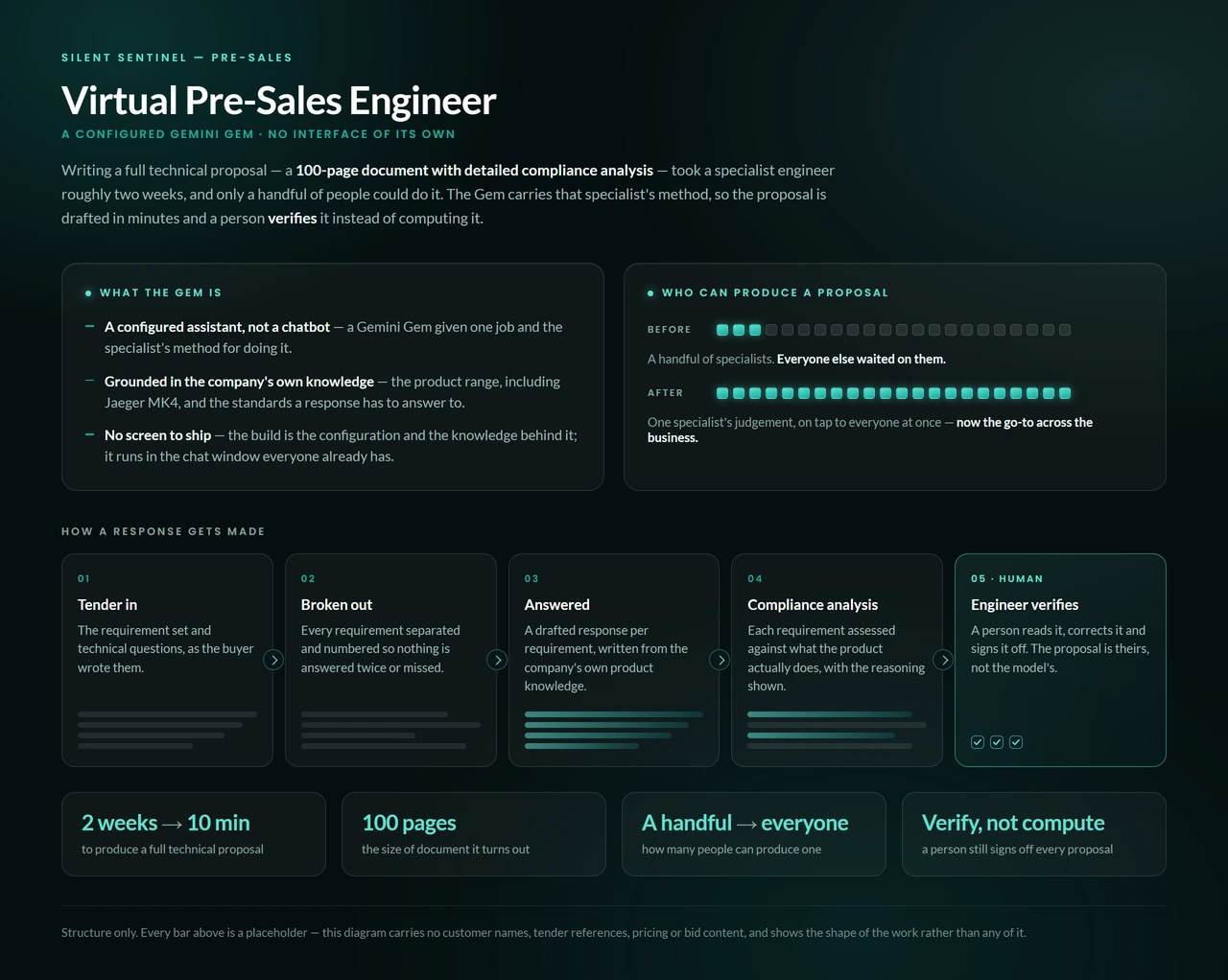
AI assistantA specialist pre-sales engineer's method, available to everyone in the business at once. It has no interface of its own.
A full technical proposal runs to 100 pages with detailed compliance analysis. It took a specialist engineer about two weeks, and only a handful of people could write one. Everyone else waited.
The knowledge behind it was scattered across range modelling, sensor and platform specs, product selection rules, integration reference and maintenance procedure.
A curated, versioned knowledge base covering all five, driven by an instruction set that decides how each type of question is answered.
Thirteen answer modes, each with a fixed output shape, so a range study, competitive comparison or tender response comes back in the form the business expects. Hard rules enforce what can and can't be configured together.
Each change must clear 92 scripted test scenarios, 22 of them hostile prompts written to break its rules, before anyone approves it going live.
The platform takes ten source documents, so the knowledge was edited down to ten that answer what the business actually asks. Pricing never leaves it: commercial figures are stripped from everything it produces. And a person releases each version, after the tests run on a staging copy.
A two-week job became a ten-minute one. It is now the go-to across the business.
Staff check a ready answer, and one specialist's judgement reaches everyone who needs it.
SS-CameraUI
C2 platformA command-and-control platform for the Jaeger MK4 long-range thermal and daylight camera: control, analytics, evidence and an AI layer that can take the watch.
The camera's deep control surface (lens, stabilisation, detection, classification, platform geometry) was reached through an on-board web panel, one camera at a time. Operators had no single place to watch both sensors, steer, tune the picture, work detections, keep evidence and check hardware health.
The camera acknowledges commands it has not applied. Some documented controls were never built, so the software was corrected against live hardware. And camera generations differ in connection route, message framing and configuration shape.
A native Windows platform with live video, full camera command, on-frame analytics, evidence handling, maintenance and an AI operator layer on one screen.
Built across 390-plus versions with around 2,600 automated tests, verified against real cameras.
It talks straight to the camera over the local network, with no server, browser or cloud leg in the control loop.
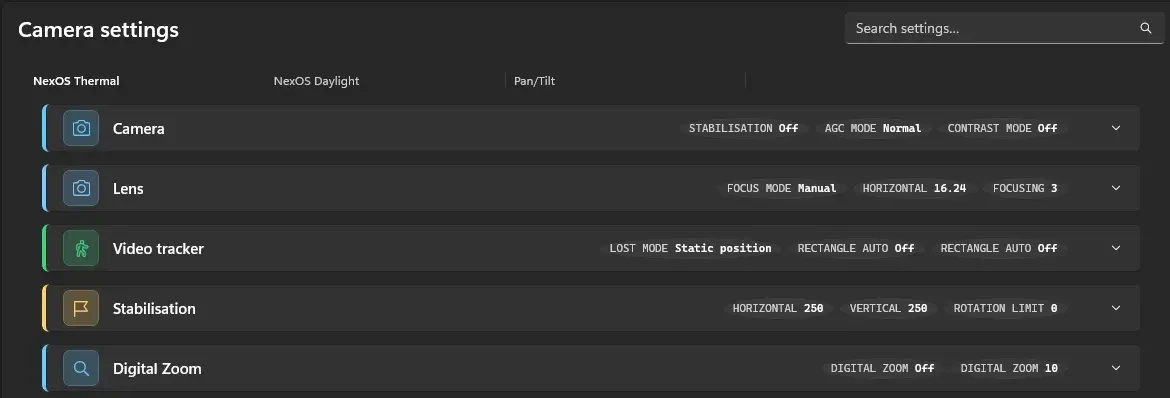
On connect, it builds the settings screen from the camera's own configuration, so a different firmware generation gets its own correct screen.
For states like stabilisation, the selected profile or an overlay, it sends the command, reads the value back, and keeps the old state on screen if the camera didn't take it. Two shortcuts were dropped: re-sending on a mismatch stuttered the video to black, and trusting the acknowledgement showed settings that never applied.
At connect it tries each route in order. The one that answers identifies the hardware generation and selects the settings shape and command paths, with nothing for the operator to configure. A retry gate stops a genuine refusal from triggering a re-detection sweep.
- Live picture
- Thermal and daylight side by side, a detachable second viewer, per-feed overlays and one telemetry bar for bearing, zoom, focus and connection.
- Camera command
- Pan, tilt and zoom on a speed curve with a dead zone and emergency stop. Focus and autofocus, keyboard control, saved positions and move-to-bearing.
- The camera's control set
- Lens, stabilisation, digital zoom, contrast and defog, palettes, image flip, motion and change detection, classification, overlays and platform configuration, read back and driven in plain English. Change history, saved scenes, backup and restore.
- Reading the camera efficiently
- Three read methods, ranked by cost: the full set in one request, then row by row, stopping after a run of failures. With settings open, only moving values (position, zoom, focus, stabilisation) are re-read.
- Warnings before irreversible changes
- Before a change that can't be walked back, it explains what will happen in plain words, with Cancel selected: motor-controller zero or reset, travel limits, the ignore-movement setting, and one thermal interval at the value that turns recalibration off.
- What leaves the machine
- Sensitive values are replaced before reaching the traffic log, activity log or a support bundle. Saved connection details are encrypted at rest by the OS keystore, per user.
- Detection analytics
- Detections ranked by class, confidence and how central they are, on a candidate rail picked with one key. Snapshots fire on classified detections, with per-track cooldowns and an hourly cap.
- Image science
- Frames scored for sharpness, contrast, noise and exposure. A scene classifier names the condition (low light, haze, motion blur, high dynamic range) and ranks reversible fixes: contrast equalisation, dehaze, exposure fusion, tone mapping, and lucky imaging, which picks the sharpest frame in a burst to beat heat shimmer.
- Visibility and range
- The haze signal becomes a visibility estimate in metres. Target range is estimated from tilt geometry and mount height.
- Situational awareness
- A map with the camera's position, live bearing and field-of-view wedge. The assistant can mark a target, fixing its position from location, bearing and range. An automated sweep stitches a seam- and exposure-aligned panorama.
- Evidence handling
- Snapshot bursts, a rolling clip buffer and a recordings library with thumbnails. Each file is stamped in UTC and never overwritten, enforced in the code.
- Maintenance and diagnostics
- Camera discovery on the network, a health dashboard (processor load, temperature, error counts), logs on demand, redacted support bundles and encrypted connection profiles.
- The AI layer
- An assistant with around fifty tools wired to the controls. Type or say "zoom tight", "move to bearing 120", "mark that boat" or "take the watch" and it acts. It describes the frame, applies image fixes, and patrols saved positions, alerting on a person detection until control is handed back.
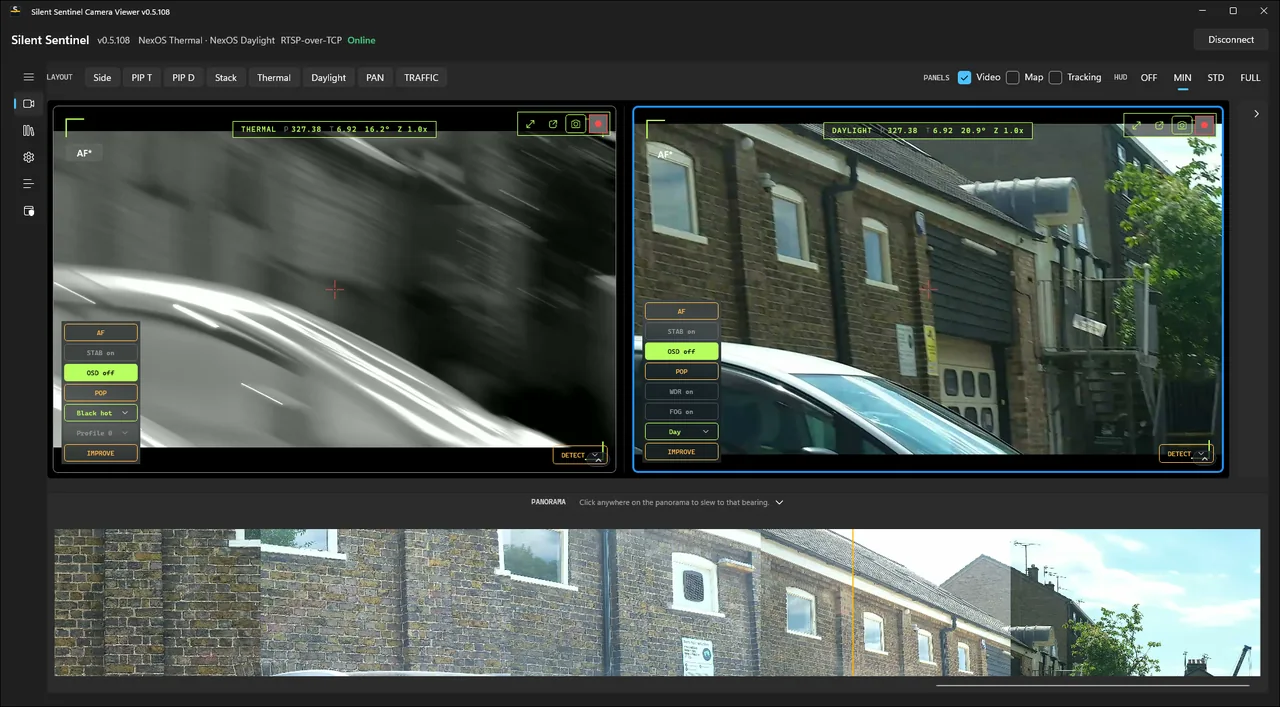
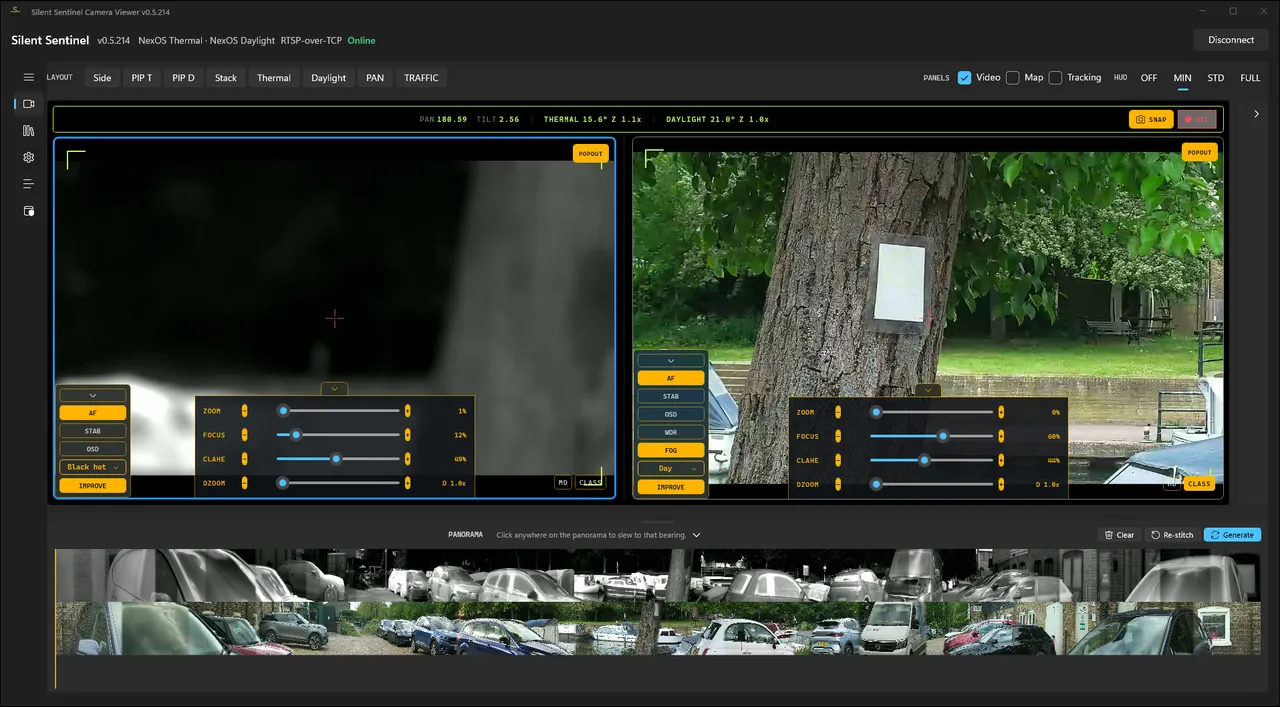
One operator on one screen, doing what used to take several tools and a specialist's eye.
Plain-language control, advised picture tuning, and a watch it holds on its own until asked to hand back.
The screen shows what the hardware actually did. One build drives more than one camera generation and works out which it is talking to.
Presales Engineer agent
Live on PRISMA presales agent on PRISM that answers technical questions in conversation, from a fixed knowledge snapshot.
Could the same specialist judgement run as an agent on PRISM, with its own contract, home and audit trail, and hold up in conversation?
A Presales Engineer agent in a test organisation on PRISM. It answers technical presales questions through its portal, inside its own contract and the platform’s guardrails.
It is a pilot: a test organisation only, with no real customer yet.
32 of 32 pilot jobs through the portal reached done or a question for a person. An independent check passed it, with findings to work through.
Take half an hour to see what a build like this would look like for your business.
No commitment and no fixed quote until it is scoped. If we go further, you own what we build.